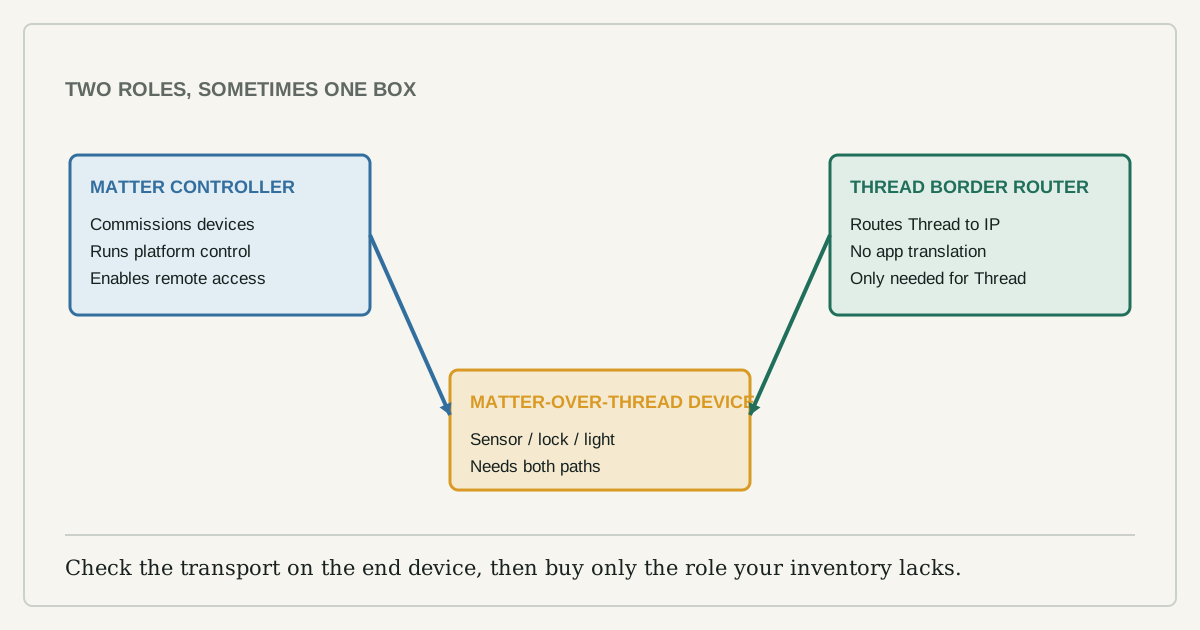
The words controller, hub, bridge, and border router are often printed beside the same small box, but they describe different jobs. Buying by shape is how a home ends up with three devices that all control lights and none that can connect the new Thread sensor.
Start with the product you intend to add. Find the Matter logo, then find the transport: Matter over Wi-Fi, Matter over Ethernet, or Matter over Thread. The transport determines whether a Thread border router is relevant. The platform you want to control it from determines which Matter controller you need.
Five roles that sellers blur together
| Role | Job | When you need it |
|---|---|---|
| Matter end device | The bulb, plug, lock, sensor, or appliance being controlled | This is the product you are adding |
| Matter controller | Commissions and controls Matter devices through a platform | At least one controller for the platform you use |
| Thread border router | Routes between the low-power Thread mesh and the home IP network | Only for Matter-over-Thread or other Thread devices |
| Bridge | Presents devices from another protocol, such as Zigbee, to Matter | When the existing ecosystem supports a certified bridge path |
| Vendor hub | A product name that may contain one or several of the roles above | Only after its specifications identify the role you lack |
Matter is the application standard. Thread is one network transport Matter can use. A border router is not automatically a Matter controller, and a controller is not automatically a Thread border router. Some speakers, displays, routers, and set-top boxes include both functions, which is convenient but also why the product name alone proves nothing.
What is already in the home?
Make a one-page map with four columns: device, model, claimed role, and platform. Use the manufacturer's current support page, not an old review. Record which box is your Matter controller and whether any device explicitly says it is a Thread border router.
Next, check the new end device. A Matter-over-Wi-Fi plug does not require Thread. A Matter-over-Thread contact sensor does. A Zigbee light advertised as "works with Matter" may still depend on its vendor bridge. The Connectivity Standards Alliance notes that Matter can bridge protocols such as Zigbee, but that does not turn every old bridge into a Matter bridge; the manufacturer must provide that path.
Two layouts cover most homes
For a Matter-over-Wi-Fi device, the smallest layout is the end device, Wi-Fi, and a Matter controller. For a Matter-over-Thread device, add a Thread border router. For an existing Zigbee collection exposed through Matter, the vendor bridge remains in the chain.
Remote control adds another condition. Matter uses local connectivity, but the Alliance explains that remote access for a Matter-only device requires an internet-connected controller in the home. That is different from saying every command must pass through a vendor cloud.
Buy the missing role, not another ecosystem
- Choose the control platform the household will actually use.
- Confirm a current Matter controller for that platform is already present.
- Check the new device's transport on the box or certification listing.
- If it uses Thread, confirm a border router is present and enabled.
- Check whether shared household members need multi-admin access through another platform.
- Buy a new hub only when one named role is missing.
Do not buy a generic "Matter hub" because a retailer says it future-proofs the home. Ask which controller platforms it supports, whether it contains a certified Thread border router, whether it bridges an existing protocol, and what still works if its internet service is unavailable.
Multi-admin is not the same as copying an account
Matter multi-admin allows a device to be shared with more than one platform. That can let one person use one ecosystem while another uses a different one. It does not mean every vendor-only feature moves with the device. Energy histories, camera recordings, dynamic lighting scenes, or firmware tools may remain in the maker's app.
Test the basic controls from each platform before building automations. Name the device consistently and retain the original setup code in a secure household record. Do not photograph setup QR codes for a public article or leave them on a shared noticeboard.
A missing role leaves a specific symptom
If commissioning never begins, confirm Bluetooth and local-network permissions for the setup phone. If a Thread device pairs beside the hub but fails in its final room, investigate mesh reach and powered Thread routers rather than buying another controller. If local control works but away-from-home control does not, inspect the controller's internet and account state. If old Zigbee products are absent, check the bridge's Matter support rather than the Thread network.
One symptom should lead to one role. Replacing the whole stack at once destroys the evidence that would tell you what was actually missing.
Where this guide stops
Certification and platform support change. Before purchase, verify the exact model in the Alliance product database and the platform maker's current support list. Matter improves interoperability; it does not guarantee that every feature, app, subscription, or privacy choice is identical across ecosystems.