Storage is not a footnote to a security camera. It decides what remains after the internet fails, what disappears if the camera is stolen, who holds the recording, how long an event survives, and whether a useful clip can be exported without paying for a different plan.
The right comparison starts with one incident you would genuinely need to review: a parcel at the front door, movement in a shared corridor, or an alert while the home is empty. It does not start with the longest feature list.
The two failure directions
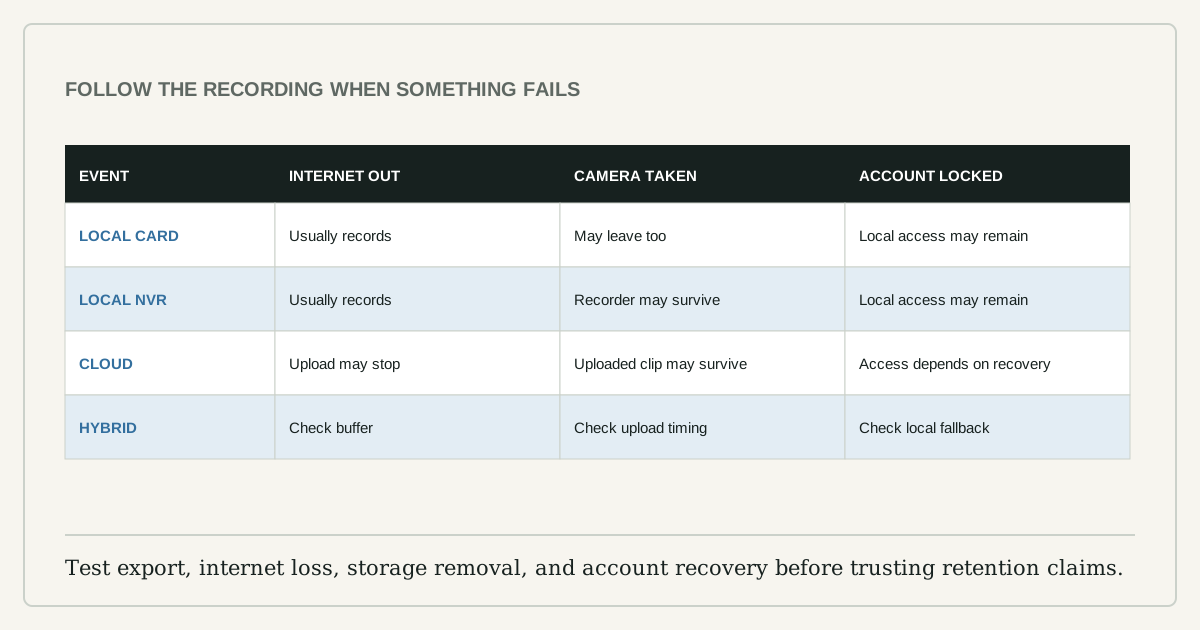
Local storage keeps recordings on a card, recorder, or home server. It can continue when the internet is unavailable if the camera and storage path still have power and the product supports local recording. But a card inside the camera can leave with the camera.
Cloud recording sends footage to a provider. Off-site storage may survive theft of the camera, but it depends on internet upload, an account, the provider's service, and the subscription conditions. If the network fails before the event uploads, the cloud cannot recover what it never received.
Many products use a hybrid: local buffer plus cloud events, or local recorder plus remote account. Evaluate the actual model rather than treating the brand as one architecture.
Compare the evidence path
| Question | Local storage | Cloud recording |
|---|---|---|
| Internet outage | May keep recording locally | Upload and remote alerts may stop |
| Camera theft | Card in camera may be lost | Uploaded footage may remain |
| Ongoing cost | Card or recorder replacement | Subscription can change |
| Retention | Limited by capacity and overwrite settings | Limited by plan and provider policy |
| Access | Local app, recorder, or card reader | Provider account and app |
| Privacy exposure | Depends on LAN, device, and local account security | Adds provider account, service, and data handling |
Neither column is automatically private. A badly secured local camera can expose a live stream. A cloud service can offer strong encryption and account controls but still create a larger trust relationship.
Run five tests before choosing a plan
First, trigger a normal event and time how long it takes to appear. Second, disconnect the home's internet for five minutes without cutting local power, trigger another event, then reconnect and inspect what was retained. Third, remove the storage card or disconnect the recorder and confirm whether the camera warns you. Fourth, export a clip in a common format and play it outside the vendor app. Fifth, sign in from a second device and review the account's sharing and session controls.
These tests reveal more than a storage-size comparison. A system that records silently onto a failed card is worse than one with shorter retention and a clear storage-health alert.
Estimate local retention honestly
Retention depends on bitrate, recording hours, number of cameras, and overhead. The useful formula is:
storage per day = average bitrate x recording seconds / 8
Use the camera's measured or documented average bitrate for the chosen quality, not the maximum printed on a retailer page. Motion-only recording varies with the scene: a busy street, moving tree, or insects near an infrared light can create far more footage than an empty hallway.
Buy cards rated by the manufacturer for continuous or surveillance use when the camera requires it. Check the supported capacity, file system, overwrite behavior, operating temperature, and replacement guidance in the current manual.
Account and network security are part of storage
The NCSC recommends changing default passwords, keeping camera software updated, and disabling remote viewing when it is not needed. The FTC adds checking encryption, using a secure router, and considering a separate network from computers and printers.
Use a unique password and multi-factor authentication if offered. Review shared users rather than sharing one login. Disable UPnP or port forwarding unless the product documentation and your threat model genuinely require it. A cloud subscription does not compensate for a reused password; a local card does not compensate for exposed remote access.
Privacy starts with the field of view
Storage choice cannot fix an intrusive camera angle. Mask neighboring windows, public paths beyond the purpose of the camera, and private areas inside the home. In a rental or shared building, check local rules, lease terms, and household consent before installation. Audio recording can have different legal and social consequences from video.
Set the smallest useful detection zone and retention period. More footage is not automatically more security; it is more data to protect and review.
Choose by the incident you need to recover
Choose local-first when internet resilience, no recurring fee, and direct control matter, and when the recorder can be placed somewhere less vulnerable than the camera. Choose cloud-first when off-site survival and simple remote retrieval matter enough to justify the account and subscription. Choose hybrid when the product documents what continues locally and what is uploaded.
Before buying, capture four current pages: storage specifications, subscription terms, support period, and privacy/security settings. Re-check them before renewal. The useful camera is the one that produces retrievable evidence during the failure you planned for, not the one with the longest list of storage logos.