A plug can show a number without answering the question you meant to ask. A watt reading describes power at a moment; an accumulated kilowatt-hour figure describes energy over an interval. Neither, by itself, proves what a change will save. Start by identifying the quantity, the interval and the costs that actually change with consumption.
This guide contains document analysis and invented arithmetic, not measurements of an appliance or a smart plug. Three source records come from three organisations: the University of Alaska Fairbanks, TP-Link and Ofgem. They address different questions; their presence is not independent validation of a product. No household records, photographs, account details or serial numbers are needed to use the blank worksheet.
Keep four quantities separate
| Quantity | What it answers | What it does not establish |
|---|---|---|
| Instantaneous power, W | What is the reported draw at that moment? | Energy over a changing workday |
| Interval energy, kWh | How much accumulated between two valid readings? | Which activity caused the consumption |
| Average power, W | Interval energy divided by elapsed time, with units converted | Peak draw, starting current or electrical compatibility |
| Estimated variable cost | Interval energy priced at the applicable unit rates | The whole bill or the saving from an untested change |
The University of Alaska Fairbanks calculation guide relates average watts, operating hours and kilowatt-hours. It also distinguishes nameplate wattage from consumption at a particular setting. We use those unit relationships, not its historical Alaskan prices, typical appliances or voltage assumptions. A nameplate maximum is not an observed average for an office computer.
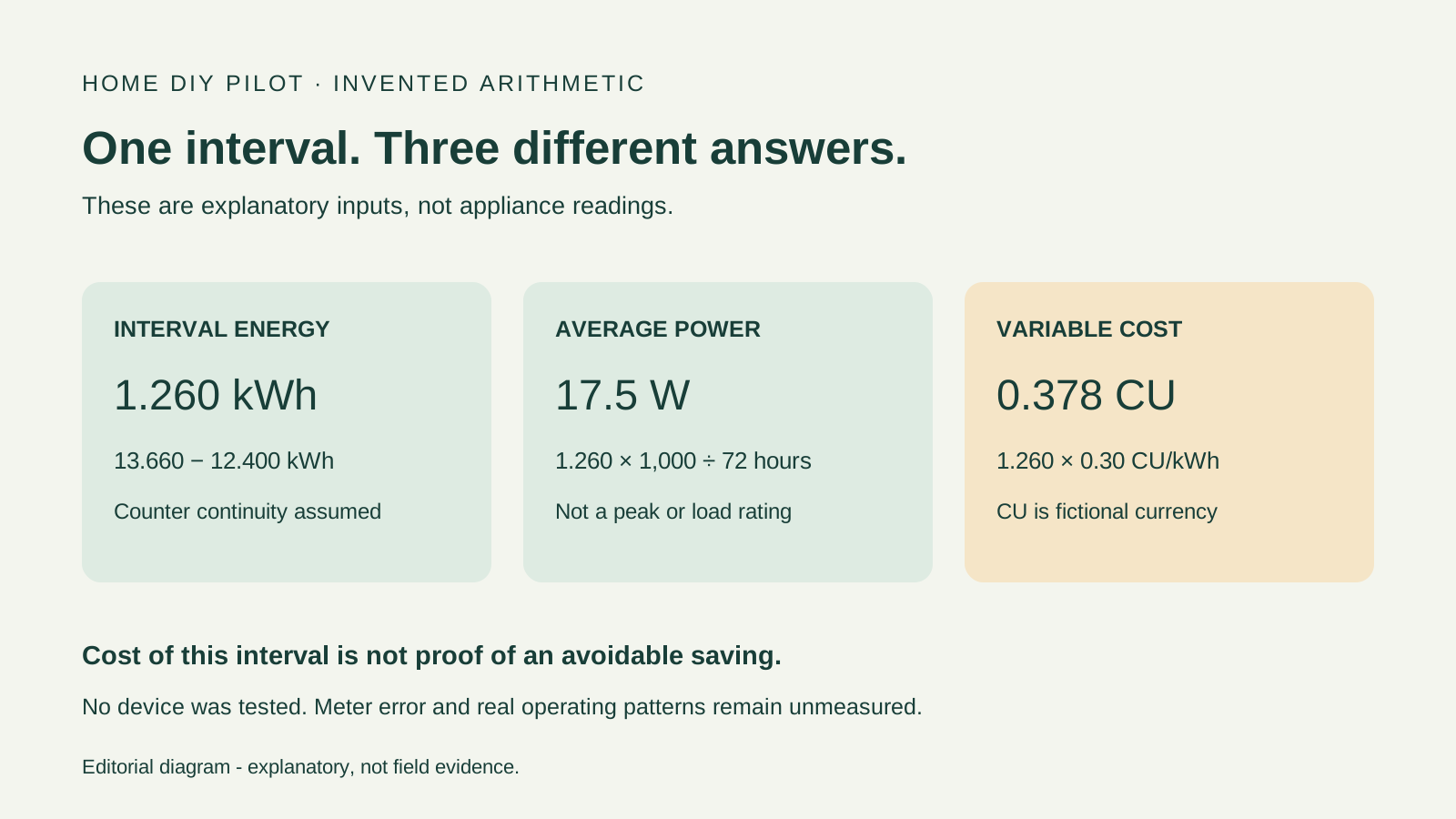
For a continuous counter, interval energy is the ending kWh minus the starting kWh. Average watts are interval kWh multiplied by 1,000 and divided by elapsed hours. A low average does not make an unsuitable load safe to connect: averages can conceal short peaks.
Check what the product document actually promises
The Tapo P110 EU datasheet at the October 2023 document path describes energy monitoring and an electricity-rate setting for estimates. Its final page separates a 16 A / 3,680 W general-use or resistive-load rating from a 1/6 HP motor rating, and says supported maximum power depends on the appliance. The watt figure is therefore not a universal permission for every load type.
This is a document example, not a recommendation to buy or connect that model. Confirm the actual regional product, revision, socket compatibility and both devices' instructions. The filename's version-like text is not proof of the hardware revision in someone's hand. This review does not establish accuracy at small loads, which consumption the counter includes, data retention during an outage, or present firmware behaviour. Those remain questions for the matching documentation or an appropriately designed test.
Do not use this worksheet to improvise an adapter arrangement, modify wiring, exceed a rating, or trial an excluded or safety-critical appliance. Resolve uncertain compatibility before collecting readings; a calculation cannot resolve it afterwards.
Work an example without turning it into a measurement
Every input below is invented. CU means fictional currency units, not a current tariff. The examples assume counters and elapsed times are valid; they contain no estimate of meter error.
| Invented case | Calculation | Result and boundary |
|---|---|---|
| Counter rises from 12.400 to 13.660 kWh over 72 hours | 13.660 - 12.400 | 1.260 kWh; average 17.5 W |
| That energy costs 0.30 CU/kWh | 1.260 × 0.30 | 0.378 CU of variable energy cost |
| 0.900 kWh costs 0.32; 0.360 kWh costs 0.18 | 0.900 × 0.32 + 0.360 × 0.18 | 0.3528 CU; energy assigned to each rate matters |
| Counter falls from 12.400 to 0.050 kWh | Discontinuity; do not subtract as usage | No valid interval total from these endpoints alone |
The example inputs, small recalculation script and blank interval worksheet make this analysis inspectable. Save the inputs as examples.json beside recalculate.py and run `python recalculate.py` with Python 3; no extra packages are needed. The script reads the supplied example file and prints arithmetic. It contacts no device and obtains no measurement. It rejects a decreasing counter or a non-positive interval instead of silently supplying a plausible-looking number.
Price consumption, not an allocated share of every bill charge
Ofgem's bill explanation distinguishes unit rates, multi-rate tariffs and a daily standing charge payable even without consumption. That is British billing guidance, not a description of every country's tariff. Here it illustrates why a fixed charge and a consumption-dependent charge belong in different columns.
Use the consumption-dependent price components that apply to the interval. If a fixed fee would remain unchanged, allocating part of it to an appliance does not make that allocation an avoidable saving. With time-varying prices, a total kWh figure alone cannot identify the correct cost unless energy can be assigned to the relevant periods. Do not substitute an unweighted average of two rates simply because the app offers one price box.
Include the monitoring arrangement in the question
Consider a second wholly invented scenario: eliminating a 1 W standby load for 16 hours each day avoids 5.84 kWh over 365 identical days. Suppose the added monitor itself uses 0.6 W continuously and that this use is additional and excluded from the load reading. Its assumed annual use is 5.256 kWh. The modelled net reduction is then only 0.584 kWh, worth 0.1752 CU at the fictional 0.30 rate.
None of those powers is a measured P110 value. This is a sensitivity example: the answer depends on the boundary drawn around the equipment. If monitor consumption is unknown, leave the net saving unknown. Purchase cost, changed behaviour and real operating patterns would require additional inputs; this calculation is not a payback claim.
Record a useful interval, not a compulsory seven-day ritual
The worksheet asks for start and end readings, elapsed time, counter continuity, operating context, rate periods and unresolved limits. A calendar week is a possible observation window, not a guarantee of representative use. A holiday week and a normal working week can differ without any intervention having worked.
Keep a reset, missing segment or unexplained counter change visible. A rounded zero is not proof of zero consumption. Before comparing two periods, ask whether they cover comparable operating states and durations. The useful output may be a narrower question for the supplier or a decision that the available data cannot distinguish the proposed change. That is more informative than filling an unknown cell with an annual saving.