A wireless closet light fails in two irritating ways: it stays dark while you search a shelf, or it switches on every time someone walks past the open door. Both are usually placement problems. The sensor must see the motion that matters without seeing the traffic that does not.
For a renter-safe project, stay with a battery light, rechargeable light, or a plug-in lamp controlled by a listed plug-in sensor. Do not open a junction box, replace a fixed luminaire, or conceal a flexible cord in a wall. A hardwired occupancy sensor is electrical work and belongs outside this guide.
Identify the sensing method
Most small closet lights use passive infrared sensing. PIR responds to changes in heat moving across zones in its field of view. It does not see through a solid door, storage bin, hanging coat, or shelf panel. Movement across the sensing pattern is normally easier to detect than slow movement directly toward the sensor.
Some products add a light sensor, so they refuse to turn on when the room is already bright. Others use microwave or radar sensing, which may detect movement through thin materials and create different false triggers. Read the manual before applying generic PIR placement rules.
Two cones define the problem
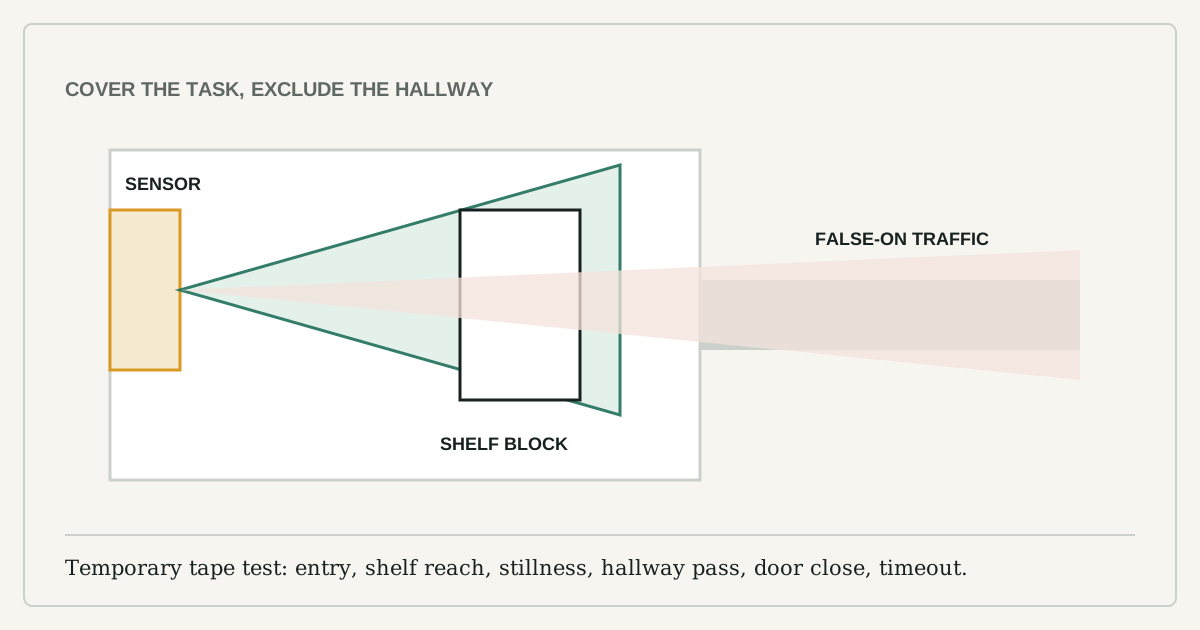
On a quick top-down plan, draw one cone from each candidate mounting point. The first cone should cover the hand entering, the person stepping in, or the door opening. The second should show unwanted motion: hallway traffic, a bedroom walkway, a pet route, or clothes moving in an air stream.
Choose the position with the cleanest separation. A light mounted deep above the top shelf may illuminate well but fail to see entry. A sensor on the door frame may detect entry but throw shadows behind hanging clothes. Often the useful compromise is high on a side wall, aimed diagonally across the opening and the shelf face.
A temporary mount exposes false triggers
Use painter's tape or a removable strap to hold the light temporarily. Test these six events at normal speed:
| Test | Pass condition |
|---|---|
| Open the door from darkness | Light comes on before reaching into storage |
| Reach toward the lowest shelf | Sensor sees the hand or body movement |
| Stand still and read a label | Timeout is long enough for the task |
| Walk past the open door | Hallway traffic does not trigger repeatedly |
| Swing hanging clothes | Normal fabric movement does not create a loop |
| Close the door | Light turns off after the chosen delay |
The Department of Energy placement guide warns about blocked sight lines, sensors aimed into adjoining traffic areas, and wall sensors hidden by an open door. Those commercial-room lessons translate directly to a closet.
Moving air and heat create edge cases
PIR sensors can false-trigger near supply registers, fans, or rapidly changing heat. DOE and Lutron guidance both treat HVAC proximity as a placement problem. Do not mount directly above a warm appliance, beside a hot pipe, or in the path of a vent. In a tiny closet, the practical response may be a door-contact light rather than a motion sensor.
The light and sensor need separate aim
The brightest-looking installation is not always the most useful. Place the LED so the shelf front is lit without shining directly into the user's eyes. A light on the ceiling can put the user's body between the source and the shelf. A slim bar on the front underside of a shelf may produce better task light, while a separate sensor faces the entry.
If the light and sensor are one unit, rotate it through several angles during the temporary test. Photograph the winning angle before removing it to prepare the surface.
Adhesive mounting is a materials test
Clean the mounting area only with a product allowed by both the surface finish and adhesive instructions. Let it dry. Check the temperature range and whether the adhesive is approved for painted drywall, laminate, unfinished wood, or metal. A removable strip can still lift weak paint, especially over old filler or damp walls.
For a heavy rechargeable bar, use the supplied mechanical or magnetic bracket when permitted rather than trusting a generic adhesive. Do not mount above fragile items until the trial has survived several charge-removal cycles.
Timeout and brightness follow the task
A ten-second timeout may work for grabbing a coat but fail while comparing medicine labels. Longer timeouts reduce dark interruptions but use more battery. Start long enough to complete the actual task, then shorten only if the light remains on after the door closes.
If the device is connected, apply the same basic security hygiene as other smart devices: unique account credentials, updates, and no remote feature you do not need. For a closet, a local sensor often delivers the useful behavior without creating another cloud account.
When a battery light is the wrong fix
Stop if the light becomes hot, the battery swells, the adhesive pulls paint, the mount loosens, the sensor requires drilling near unknown wiring, or the installation blocks the door or shelf. The successful setup is not the most automated one. It is the one that turns on before your hand enters, stays on for the task, and remains secure after ordinary use.